




Every industry comes with its own language, so this is our version of printing 101.
Feel free to browse through our FAQs, glossaries, helpful hints about completing projects, downloadable software archives, and application tips and tricks.
Here you'll find answers to common questions our clients ask. Start by selecting one of the links below. If you don’t see what you need – call or contact us online.
- What type of products and services do you provide?
- How do I go about getting an estimate from you?
- Tips on how to save your design files
- Tips on File Set ups / Formats / Collect for Print
- At what resolution should I save my photos and graphics?
- What is a proof and why is it important that I look at it?
- What is a PDF?
- What is the Pantone Matching System?
- Why do the printed colors look different from the colors on my screen?
- Is white considered a printing color?
- What file format should I use when submitting my electronic document for printing?
- Once I submit the documents, how long will it take to finish my job?
- Are you a “green” company?
- What is variable data printing?
- What does personalization mean?
- What is PURL
- What type of return can I expect from personalized or variable data marketing materials?
- What do I need to provide for variable data projects?
- Can you scan and save my files to PDF?
- What is a QR Code?
- What is a Mobile Website & Why should I have one?
- What is Social Media Marketing?
- What does SEO stand for?
- Imposition - what does it mean in printing terms?
- Readers Spreads VS. Printers Spreads
- How do I care for my Imprinted Tablecloth or Fabric Exhibit Material?
- What does it mean to score paper?
- What is Vector Artwork?
- What does CYMK mean?
- What is Rich Black?
- What does RGB mean?
-
Good question! We are a full service shop and offer a wide range of products and services. "Everything you need to market your business" To see a full listing and description of what we can offer you, check out the Products & Services area.
-
CLICK ON THE BLUE TEXT ABOVE TO GO TO THE ESTIMATE FORM
Well, since you are here, we would suggest you use our online estimate request form. Otherwise, the best way to ensure that we get all the information necessary to do an accurate quote is to give us a call and talk with one of our customer service representatives. -
Tips on how to save your design files
Make them print ready and acceptable for us to print.
Most applications will allow you to print to PDF or to export as a PDF.
PREFERRED PROGRAMS ACCEPTED:
Adobe Creative Suite: (mac & pc)
InDesign • Illustrator • Photoshop
QuarkXpress
Adobe PDFs * see below
Other Software*
(not suitable for offset printing)
Publisher
Microsoft Office (mac & pc)
Word, Excel, Powerpoint
*save as PDF preferredFormats Requirements:
.pdf press quality for print
print quality for copying
*CMYK & Spot color for print
.indd Adobe InDesign doc - Package
*must include .idml file, all fonts & images
.qxd Quark doc -Collect for Output
*must include all fonts & images
.eps convert text to outlines
.tif High resolution (dpi=dots per inch)
(300 dpi Image, *800 dpi TEXT)
* to ensure crisp type 800-1200 dpi
.jpg High resolution 300dpi +
cannot accept low-res. web imagesbleed: when the ink on the card goes right to the edge of the business card
non-bleed: no ink on the card goes to the edge of the business card, at least 1/8” of white space around edge -
Tips on File Set ups / Formats / Collect for Print
Many layout programs have collecting or packaging functions that will automatically collect your document, fonts, all art including and a report. When possible, it is recommended to use these functions because without any or all of these elements we will be unable to print your project.
• Enclose all screen fonts and printer fonts
• Include all placed images
• Make sure your files are set with proper bleed, trim and safety areas.
BLEED: All art trimming off the edge MUST be pulled out 1/8” (.125) beyond the trim line
TRIM: This is the guideline where the card will be cut
SAFETY: All art and text within this safety area will assure that nothing will be trimmed off during the cutting process. A 1/4” guide in from the trim should work fine. -
At what resolution should I save my photos and graphics?
Resolution for photographs & graphics not containing type should be set to 300 dpi.
Any files containing type should be saved as vector art (PDF or EPS) at last 800dpi to ensure sharp readable type.Pictures and graphics pulled from the internet are often low resolution, typically 72 dpi or 96 dpi. Avoid these graphics, as they will appear pixilated and fuzzy when printed.
Also note that you should save all photos in CMYK mode, not RGB mode when possible. Images saved in RGB mode may not print properly. If you are unable to save your image in CYMK mode, please let us know.
Contact us with any questions or clarification you may need- We will be happy to help you!
-
What is a proof and why is it important that I look at it?
A proof is a copy of your document after all modifications and printing setup processes have been completed. It is your LAST and BEST opportunity to check everything and make sure that the print job comes out the way you want. By carefully inspecting the proof, you can help us assure an accurate printed piece.
Attention to detail is the key to successful proofing.
Below is a list of some things to look at:Is the pagination correct?
Is the color accurate, pleasing?
Are text and graphics in the right places?
Are there any typos?
Is any type broken?
Are photos positioned, cropped and scaled correctly?
Are bleeds, perforations and folds indicated properly?
Is the trim size correct?
Are borders correct?
Are elements aligned at the tops and bottoms of sections or pages?
Are screen values correct? -
What is a PDF?
Portable Document Format (PDF) is now an open standard for electronic document exchange maintained by the International Organization for Standardization (ISO). When you convert documents, forms, graphics, and web pages to PDF, they look just like they would if printed.
You can view and interact with PDFs on virtually any platform, including Windows®, Mac OS, and mobile platforms including Android™ and iOS for iPhone and iPad.HIGH RESOLUTION PDF FILES for Printing
* A Locked file format, which can eliminate file variations due to platform, software or version issues. as long as fonts are embedded or outlined.
* A compressed file format, which means smaller files and faster upload times in single file format, which makes for faster and easier uploads.
A PDF helps to insure that your job proceeds quickly, smoothly and with no unexpected "surprises."
To learn more about PDF types, visit our Resources section:
http://www.prin-tech.com/resources/tipsandtricks/article.html/title/know-your-pdf -
What is the Pantone Matching System?
The Pantone Matching System (PMS) is a color reproduction standard in which colors all across the spectrum are each identified by a unique, independent number. The use of PMS allows us to precisely match colors and maintain color consistency throughout the printing process.
-
Why do the printed colors look different from the colors on my screen?
In short, printers and monitors produce colors in different ways.
Monitor calibration, lighting and the use of Pantone® colors can affect the color fidelity of PDFs and JPEGs.
-
Is white considered a printing color?
Not typically. Because white is the default color of paper, it is simply recognized as the absence of any ink. Printing white ink on colored paper is not advised.
-
What file format should I use when submitting my electronic document for printing?
PDF (Portable Document Format) is the most common and preferred file format for submitting digital documents. With the installation of a PDF print driver on your computer, virtually any program can generate a PDF file suitable for printing. Both commercial and free PDF print drivers are available online for download from different sources.
-
Once I submit the documents, how long will it take to finish my job?
Simple jobs are often completed the same day. Some jobs, however, may take several days to complete depending on their complexity and size. We always strive to provide an accurate estimate of the turnaround time for each job we do. And we’ll always work with you to find ways to complete your project when you need it.
-
Are you a “green” company?
Absolutely! We take very seriously our role in preserving the environment and integrate numerous green practices into our daily operations. In addition to energy-efficient equipment and soy based inks, we can perform many print jobs using recycled paper stock. We use papers supplied by Forest Stewardship Council® (FSC)certified vendors.
If you would like to use recycled paper for your next print job, let us know.
-
What is variable data printing?
Variable data printing is technology for printing documents so that each piece is personalized to the specific recipient. At the most basic level, this means personalizing a name and address. But for real impact, many projects include unique graphics and content that speaks directly to the recipient.
In today's world, organizations have the benefit of interacting with their customers in ways never before possible. In fact, the most cutting-edge companies actually engage in a two-way conversation with their targeted audiences, using technology like personalized URLs to provide ultra-personal communication that lets people know you value them individually.
http://www.prin-tech.com/directmarketing/purl.html -
What does personalization mean?
Personalization is another term for variable data—technology for printing documents so that each piece is personalized to the specific recipient.
Personalizing can be as simple as a unique name and address on every printed piece. But more sophisticated levels of personalization can include text or images that vary based on data specific to the recipient, or data-driven graphics such as a pie chart illustrating something specific to the recipient.
-
What is PURL
Personalized URLs (PURL’s)
One of the most powerful words you can use when marketing your products and services is your customer's name.
By using PURLs in your mail and other direct marketing pieces, you provide your customers with an opportunity to visit a web page that is set up specifically for them. This creates a fun, interactive experience for both you and your current and potential customers. -
What type of return can I expect from personalized or variable data marketing materials?
Studies consistently show that personalized marketing receives a far greater response than static pieces.
On average, the response rate of a static direct mail campaign is around 2%. A targeted, personalized campaign that utilizes variable data technology can increase that response rate by up to 30%.
While the cost per piece of variable imaging direct mail is higher, your cost per response is much lower, increasing your return on investment.
-
What do I need to provide for variable data projects?
We work with many types of data files, but CSV files are the safest bet. These are data files that have commas separating each field, and returns separating each line of data. To save time and hassle, make sure your data is properly formatted with each piece of data in separate fields.
Complex projects may require other files, like image files or additional data files. If you are unsure of what may be required for a particular variable project, give us a call for a free consultation.
-
Yes. We can scan documents & save to PDF for compact storage & email them to you or burn to a CD.
We can also scan artwork and save electronic versions (PDF, TIF, JPEG, etc.) & email them to you or burn to a CD. -
QR code - Quick Response Code
A unique barcode, that when scanned with a smartphone with QR scanning software/app, quickly directs customers to a specific webpage or contain a phone number, an SMS message, designed with a targeted message. You can use it to make your printed materials interactive. This may include business cards, flyers, brochures, signs, clothing and other items.Your customers, prospects, and other associates will have all of your contact points at their fingertips on their mobile device.
-
A mobile website is usually a mobile version of a company's existing site, but is formatted so that it is easy to view with smartphones, tablet PCs and other mobile devices. In many cases, however, organizations choose to develop unique mobile experiences tailored to customers who are constantly on the go.
More than ever before, consumers and prospects choose how they prefer to interact with companies and their employees, using their mobile devices for:
Email
Social Media Sites: Facebook, Twitter, LinkedIn
Company Website
Text-Messages
Phone Calls
Photo-Sharing Apps: Flickr, Instagram
Online Video: YouTube, Vimeo
and more… -
Social media marketing refers to the process of gaining traffic or attention through social media sites offering genuinely new ways for people to connect
Social media is a catch-all term for sites that may provide different social actions. For example, Twitter is a social site designed to let people share short update messages with others. Facebook, in contrast is a full-blown social networking site that allows for sharing updates, photos, joining events and a variety of other activities.
-
What does SEO stand for?
SEO stands for “search engine optimization.”
It is the process of getting traffic from the “free,” “organic,” “editorial” or “natural” listings on search engines. All major search engines such as Google, Yahoo and Bing have such results, where web pages and other content such as videos or local listings are shown and ranked based on what the search engine considers most relevant to users. -
Imposition - what does it mean in printing terms?
Imposition is one of the fundamental steps in the prepress printing process.
Converting the file from "Reader Spreads" to "Printer Spreads"
It is the page set up to go to press & be backed-up and in the proper order to for binding, etc.Correct imposition minimizes printing time by maximizing the number of pages per impression, reducing cost of press time and materials.
-
Readers spreads show consecutive pages in two page spreads. They are in the correct order for someone to read the document. This is typically how a document is set up when you are creating it. However, when you send the document to your Printer/ Service Provider they will need to convert the file (Imposition) to Printer Spreads so that it prints in the correct order.
Printer spreads are not in consecutive page order, they are in proper order for the printer so that when the document is printed, trimmed, assembled, folded and stitched together, all the pages will back up to each other properly & appear consecutively.
CLICK ON THE LINKED TITLE ABOVE FOR A PDF ILLUSTRATION OF READERS SPREADS VS. PRINTER SPREADS
-
Click on the link above to Download the Care Instruction Sheet for Imprinted Fabric Exhibit Material.
-
What does it mean to score paper?
Scoring is a deep indent or crease put in the paper where it needs to be folded. Scoring the paper enables easy folding and a professional look.
Typically thicker paper needs to be scored so that it does not crack.
-
 What is Vector Artwork?
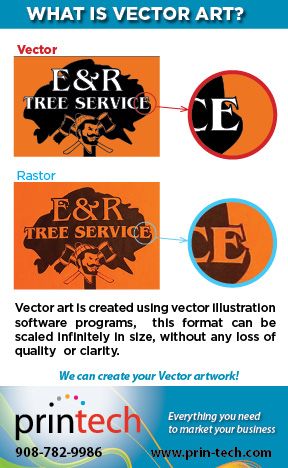
Vector art is created using illustration software programs like as Adobe Illustrator and Freehand. These programs use mathmatic equations and geometric primitives (points, lines, and shapes) to create art that is clean, camera ready, and can be scaled infinitely in size without any loss of quality or clarity.
In a Raster art file, the edges of the art become distorted & pixelated when the picture is enlarged. The edge is choppy or fuzzy.
Raster Graphics, such as photographs, and graphics files created in Adobe Photoshop, Paint Shop Pro, and other Raster editing programs, can be used for some applications but in most cases, especially with logos you need Vector art for clean, crisp printing at any size or use.
Vector art is typically created in Adobe Illustrator, and saved as a specific file type: .ai
Vector art can be saved in other file formats (such as .eps or .pdf). But, it is important to remember that just because a file is saved in one of these formats, that does not mean that it is truly vector art. Only art originally created in a vector program like Adobe Illustrator, it true vector art.
There are some file formats that can only be Raster art, and therefore cannot be Vector art. The most common examples are .jpeg, .png, .bmp, .gif, .psd, .tif. These files cannot be vector art.
The best way to find out for sure is to ask a graphic designer to check the file for you.
Printech can check your file for you!
-
 What does CYMK mean?
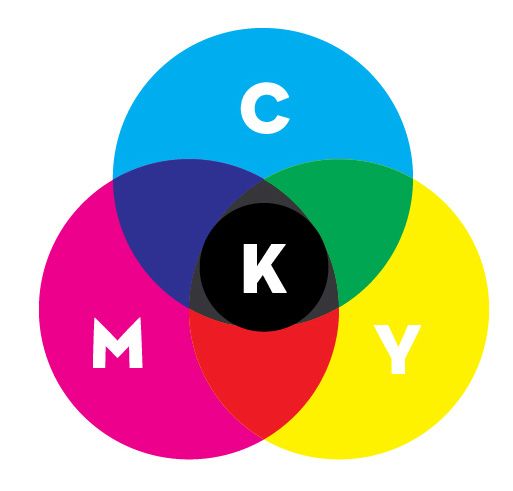
CMYK refers to the four inks used in color printing: cyan, magenta, yellow, and key (black).
The "K" in CMYK stands for key because in four-color printing, cyan, magenta, and yellow printing plates are carefully keyed, or aligned, with the key of the black key plateCMYK color (process color, four color) is a subtractive color model, used in color printing.
The CMYK model works by partially or entirely masking colors on a lighter, usually white, background. The ink reduces the light that would otherwise be reflected. Such a model is called subtractive because inks "subtract" brightness from white.
-
What is Rich Black?
Rich black, in printing, is an ink mixture of solid black over one or more of the other CMYK colors, resulting in a darker tone than black ink alone generates in a printing process.
A typical rich black mixture might be 100% black, and a lesser percentage of each of the other three inks (Cyan, Magenta & Yellow).
This results in a darker than black tone "Rich Black". -
 What does RGB mean?
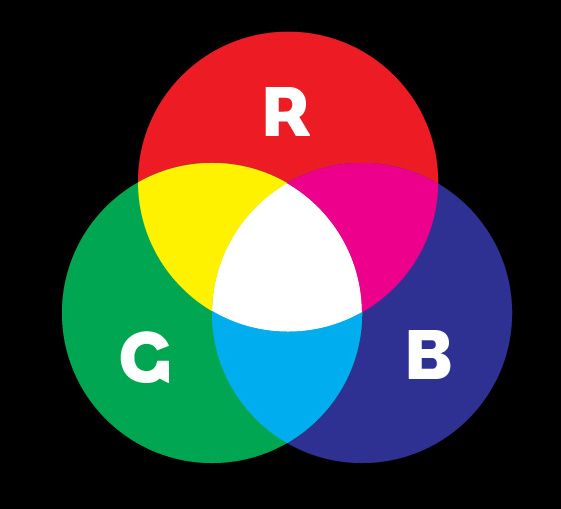
RGB comes from the initials of the three additive primary colors, red, green, and blue.
The RGB color model is an additive color model in which red, green, and blue light are added together in various ways to reproduce a broad array of colors.
The main purpose of the RGB color model is for the sensing, representation, and display of images in electronic systems, such as televisions and computers, though it has also been used in conventional photography.
RGB is not used in printing and when printed on CMYK device can result in a dark or muddy print.
To print on a four-color press, all RGB files must be converted into CMYK color.


